Showing posts with label nbc. Show all posts

Wednesday, August 10, 2016

NBC streaming the Olympics on the Internet -- quantity, not quality

NBC Sports is allowing many (not all) cable TV subscribers to stream Olympic Games events live and to watch archived copies after they finish. There are several ways to watch the streams -- in a Windows 10 app, on a TV set using the Roku app and on the Web. I checked them out and was generally disappointed.

With the Roku app, watching a live event is like watching a broadcast TV program -- you sit back and watch, but have no control. When you are watching the archived recording of a completed event, you can pause and fast forward/reverse, but that is all.

The event navigation interface is also lame. There are five linear menus: Features, Live and upcoming, Highlights, Full event replay and Sports. You scroll through a list of thumbnail images to find the one you want to watch. That is fine for the 13 features and 34 sports, but not so handy for the 300 Highlights, 771 Live and upcoming or 538 Full event replays. (These numbers will vary of course). Search is sorely missing.

There are also frequent delays for updating content and, if you try to watch a live event, you are often informed that it has concluded or will begin shortly -- they do not update menus at the time an event starts or ends.

The Windows 10 live-event user interface is a little better, but nothing to write home about. As you see below, there is a volume control and buttons to pause/resume, go full screen and to turn on/off closed captions.

NBC Sports app user interface

The navigation interface, shown below, is similar to that of the Roku. There are five linear menus: Features, Live and upcoming, Replay, Highlights and Sports. There are no scroll bars, so you use the cursor control keys to move through the selections.

Windows 10 app navigation interface

As with the Roku, the "live" events are frequently either completed or not yet begun.

The Web user interface is a bit better. As you see below, it includes the handy "15-second rewind" button and rewind and fast-forward buttons.
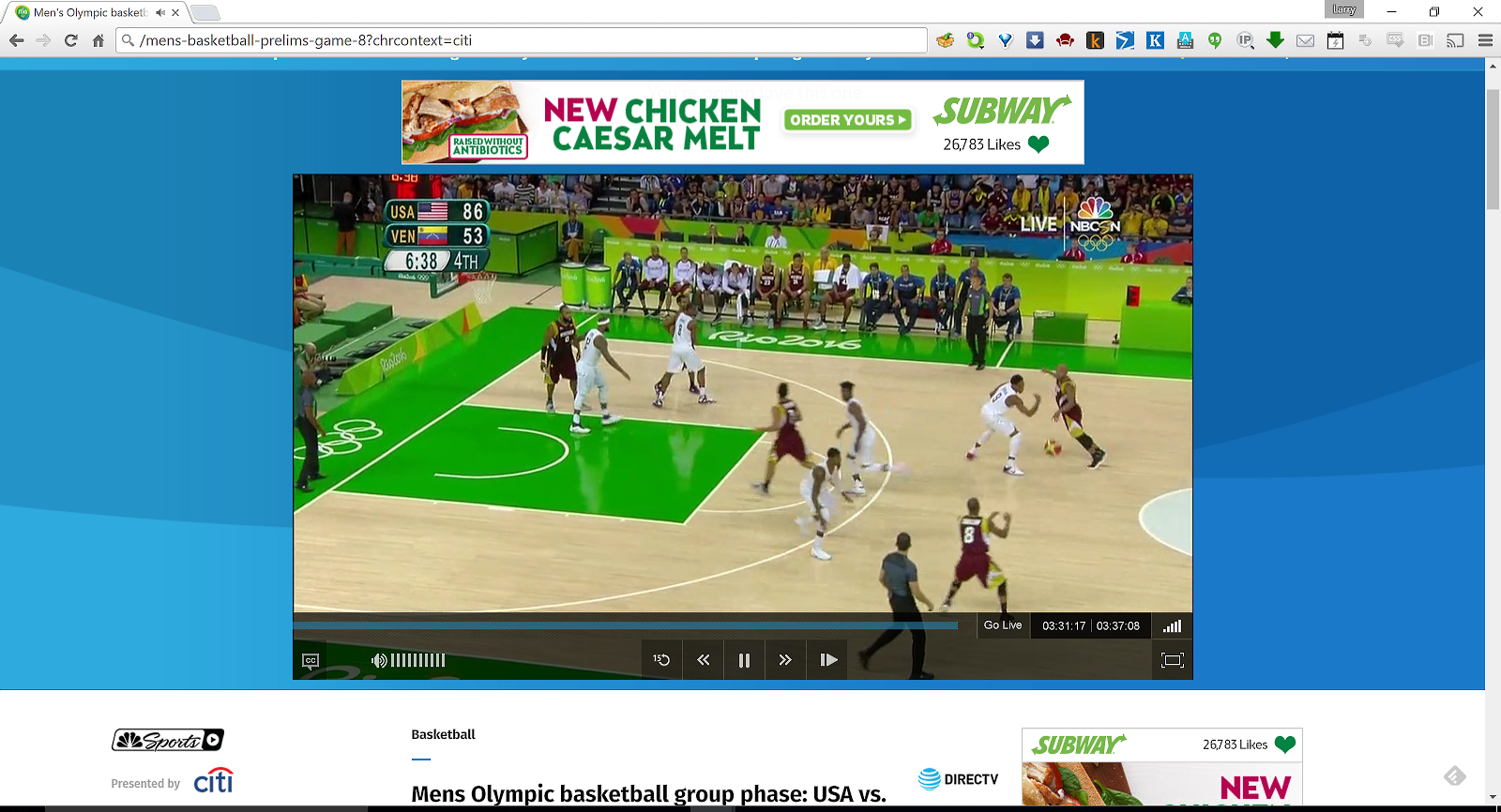
Web user interface

The Web navigation is also more flexible and complete than with the Roku or Windows 10 app. The bad news is that there are ads and you cannot go full screen. (The others also have interspersed ads).

There is also an Android app, but I am not going to bother installing it -- I prefer watching sports on a TV set and it will doubtless have some of the limitations discussed above.

As I said at the start, I am generally disappointed with NBC's streaming coverage. Part of that is because my expectations were raised by NBC's excellent coverage of the Tour de France. The mobile and desktop user interfaces were clean and powerful and they presented real time data during the race and inciteful analysis after each stage was completed. The business model was also different. You pay for Tour de France access, but do not have to watch ads (which are often followed by a screen saying the event you want to watch has already concluded).

I realize that the Olympics are a tougher event to cover -- many venues and many elimination levels -- but I hope that by 2020, the NBC Olympic team will sit down with the Tour de France team and re-design their coverage. I hope they also offer an ad-free option.

Monday, July 28, 2014

NBC's Tour de France app -- three stars and five suggestions

NBC is learning how to present live sporting events on the Internet, but still has a way to go.

I've been commenting on the online coverage of the Tour de France and the Olympic Games for several years. The BBC and IT4 in England have done a better job than NBC, but NBC is improving their sporting event coverage and I enjoyed this year's Tour using their iPad app. (They also have Web and Android versions).

Let's look at the app. The user interface has five modes -- live video, standings, stages, riders and more:

Five viewer modes

You spend most of your time in the four-frame live video mode:

The four-frame live video user interface

Live video is shown in the upper left, and one can toggle the video to full screen. The text column on the right has frames showing the peloton and other rider groups and a curated, Twitter-like news feed. The graphic frame at the bottom has five optional modes, as shown here:

Options for the bottom window

The user can zoom or pan the bottom frame, as shown here:

Bottom window zooms and pans

The text windows on the right scroll and nearly every object on the screen is a hot link. For example, touching the word Peloton below popped up a scrollable list of the names of the riders in the peloton. Touching the rider's name, would bring up data about him.

Most objects are hot links.
I spend most of my time watching live video, but frequently switch to one of the other modes to check the standings or to see how a particular rider, team or nation is doing.

The stages mode is most interesting. It has facts about each stage and, more important, archives of the completed stages. Shortly after a stage is completed, you can go back and watch highlight clips or the video of the entire stage and review the standings and other statistics.

Finally, The biggest improvement over last year was not in the data presentation or user interface, but in NBC's offer -- I paid $14.99 and there were no commercials!

Suggestions for next year

The viewing experience was better than last year, but I'd still like to see several improvements.

1. As we saw above, the live presentation consists of a video stream and three data panes. The data panes and video are synchronized as long as you watch it in real time. If you pause the video for a short time, it "fast forwards" to the current live point, where it is in synch with the ancillary data. But, if you pause for a relatively long time -- maybe half an hour or an hour -- the video resumes where you left off, but the data stream reflects the current state of the race so they are out of synch.

Check the following screen shot. The riders in the video pane are climbing a steep mountain, but the course-progress pane at the bottom of the screen shows them on the subsequent descent (blue). The text on the right is synchronized with the course-progress map, so it is also out of synch with the video.

The video and ancillary (bottom and right hand) material are out of synch.
After pausing, you should have the option of picking up where you left off or jumping to the current point in the race. Either way, the video and ancillary material should remain in synch.

2. A complete archive copy of the video of a stage is posted shortly after it ends. That is good, but the ancillary material -- group positions and news posts -- is not available. Viewing the archive video is like watching a TV broadcast -- not an Internet performance. They should archive the synchronized data stream along with the video.

3. While watching the live stream or an archive stream, I'd like to have a single-touch, 15-second video rewind, as in the UK ITV4 viewer.

4. Similarly, I would like to be able to jump to the start of a video "chapter" with a single click or tap as you could with the BBC's player from the 2012 Olympic Games. A chapter might be something like the finals of the 100 meter dash in the Olympics or the sprint to the top of a mountain during the Tour de France. The person who is maintaining the ancillary news feed would create the chapter entry points as they posted the news updates.

5. The tablet interface is suitable for "leaning forward" -- switching modes and looking things up, but the small screen in your hands or lap is not so great for just "leaning back" and watching the race. I want to be able to mirror the video on my TV screen with a single touch.

I was watching on an iPad, so could have done that if my TV set were equipped with an Apple TV interface device. I don't have an Apple TV, but I do have a Google Chromecast, and Google just announced the ability to mirror the screen of selected Android phones and tablets on a Chromecast-equipped TV set. The updated Chromecast app is labeled "beta," and it took me two reboots to get it to work, but as you see here, I can now cast my phone video to my TV set:

Mirroring a phone on a Chromecast-enabled TV set
(This video is not from the NBC app because I have that installed on an iPad, not my phone).

The video quality is good, though not excellent. The imperfection is most noticeable on text which is part of the video stream -- it is a little blurry around the edges. Static text looks fine from across the room. Chromecast mirroring works if you have a compatible phone or tablet, but, hopefully by next year, NBC will Chromecast enable their app, allowing for switching between leaning forward to display data, post tweets, etc and leaning back to watch the race on a TV screen.

At first, new media mimic old media and NBC's earlier attempts at covering live sporting events online was shaped by their traditional TV coverage -- shoot video and insert commercials. This year, they have developed good ancillary data capability to go along with their video and dropped the commercials for a flat fee. Once they get the video and data synchronized and archived and I can lean back and watch the video or lean forward and play with the data, I'll give them five stars.

Sunday, July 13, 2014

NBC's Tour de France coverage -- four stars

NBC is learning how to present live sporting events on the Internet.

I've been commenting on the online coverage of the Tour de France and the Olympic Games for several years and the BBC and IT4 in England have done a better job than NBC ... until now. This year, I am watching The Tour using NBC's iPad app, and I like it a lot. (They also have Web and Android versions).

Let's look at the app. The user interface has five modes -- live video, standings, stages, riders and more:

Five viewer modes

You spend most of your time in the four-frame live video mode:

The four-frame live video user interface

Live video is shown in the upper left, and one can toggle the video to full screen. The text column on the right has frames showing the peloton and other rider groups and a curated, Twitter-like news feed. The graphic frame at the bottom has five optional modes, as shown here:

Options for the bottom window

The user can zoom or pan the bottom frame, as shown here:

Bottom window zooms and pans

The text windows on the right scroll and nearly every object on the screen is a hot link. For example, touching the word Peloton below popped up a scrollable list of the names of the riders in the peloton. Touching the rider's name, would bring up data about him.


I spend most of my time watching live video, but frequently switch to one of the other modes to check the standings or to see how a particular rider, team or nation is doing.

The stages mode is most interesting. It has facts about each stage and, more important, archives of the completed stages. Shortly after a stage is completed, you can go back and watch highlight clips or the video of the entire stage and review the standings and other statistics.

suggestions for next year

The viewing experience is good, but I'd still like to see some improvements. One would be adding a single-touch, 15-second video rewind, as in the UK ITV4 viewer. Another would be showing the text frames -- group positions and news posts -- along with the archived video of the completed stages. (Currently you can only replay the video stream). There's also some missing data -- the rider database includes a biography field, but it is not populated.

Finally, the tablet interface is terrific for "leaning forward" -- switching modes and looking things up, but the small screen in your hands or lap is not so great for just "leaning back" and watching the race. I want to be able to mirror the video on my TV screen with a single touch.

If I had an Apple TV, I could do that now with my iPad. My YATS Podcast buddies tell me that Google is updating their Chromecast app to enable mirroring the screens of selected Android phones and tablets on TV sets equipped with a Chromecast device. Better yet, how about NBC Chromecast-enabling their app?

As I said at the start, I like this experience a lot. Some part of that is attributable to NBC's app and some is due to the inherent nature of a tablet and touch interface. I also like NBC's offer -- I paid $14.99 and did not have to watch any commercials. By next year, I expect to have a five-star setup for watching The Tour -- while leaning forward and while leaning back.

-----
Update 7/17/2014

I said one missing feature was the ability to sit back and watch race video on a TV set. Yesterday, I received an update to the Chromecast app that enables mirroring of an Android screen on a Chromecast-equipped TV set. As you see here, I can now cast my phone video to my TV set.


(This video is not from the NBC app because I have that installed on an iPad, not my phone).

This new version of the Chromecast app is labeled "beta," and it is a bit glitchy. I had to reboot the Chromecast a couple of times to get it to work.

When it is working, the video is quite acceptable, though not perfectly sharp. The imperfection is most noticeable on text which is part of the video stream -- it is a little blurry around the edges. Static text looks fine from across the room.

This brings us a step closer to the complete leaning forward and back experience for watching live sporting events -- closer to a five-star review.

-----
Update 7/20/2014

NBC has populated the biography field in the rider database and it is now displayed. That was an easy suggestion to satisfy, but the others will require some re-architecting of the system to provide access to a buffered version of the video in real time.

-----
Update 7/24/2014

I stated that my biggest criticism of NBC's iPad app was that archived replays of the video coverage of completed stages are not accompanied by the synchronized course map, news feed and dynamic standings of the live coverage -- if you miss a live stage, you cannot replay the full experience from the archive.

I've now discovered a similar synchronization problem during the live presentation. If you pause the live playback for a short time then restart it, the video fast-forwards to the current live point, synchronizing with the ancillary material, but, if you pause for a long time, the video does not catch up with the ancillary material so they are out of synch.

Check the following screen shot. The riders in the video pane are climbing a steep mountain, but the course-progress pane at the bottom of the screen shows them on the subsequent descent (blue). The text on the right is synchronized with the course-progress map, so it is also out of synch with the video.


That will cost them a "star" in my rating -- let's cut it to three stars.

Monday, July 22, 2013

Review of online coverage of the 2013 Tour de France from NBC and ITV4 (UK)

I watched the Tour de France online again this year. (My reporting on the Tour from last year). In order to compare NBC's coverage in the US with that of French ITV4, I subscribed to NBC's US coverage ($29) and also watched ITV4 via an English proxy server. Both used the same video feed, but differed in several ways -- lets's look at some of the main differences.

Video players and interaction

The NBC player ran in its own Silverlight window as shown here:


Zooming in on the controls, we see (from left to right) that the user can share a link on Facebook, Twitter, etc., adjust the speaker volume, rewind 15 seconds with a single click, see how far behind the live stream they are on the timeline, jump to the live stream, reveal running commentary (tweets) and links to highlight videos and go full screen.


I preferred to leave the running commentary and links to highlights hidden, but here is a screen shot with them revealed:


NBC used what seemed to be the same player in the 2012 Tour de France, and you can see a more complete description here.

The NBC experience was far better and more interactive than that of ITV4. ITV4 emulated watching TV, merely displaying a live video stream inside a Web page. As you see in this screen shot, the user could only stop/watch the live stream, adjust the volume or toggle between full screen and windowed mode.


NBC clearly has a better, interactive video player.  It may be that ITV4 just streamed the live stream because there was a large fee for the right to archive it.

Streaming performance

My laptop has 8GB of memory and a solid state drive and my cable service is typically 15 Gbps, but my three year old CPU/graphic controller is not up to the task of watching full screen video on a TV set, so I did most of my watching on the laptop screen.

When I tried to go to full screen on a TV set, the CPU fell steadily behind, whether I was watching NBC or ITV4 or using Chrome, Firefox or Internet Explorer.  NBC would begin at its maximum speed of 2.5 Mbps, but it would automatically step down to 350 Kbps, then start dropping frames.   ITV4 did not display their speeds, but they seemed to be about the same and the results were also the same.


This is a temporary issue.  A fast laptop would probably be able to keep up with either and future versions of the player software will be more efficient.

Current status presentation

As shown here, ITV4 provided a nice race status display below the video window. Scrolling down further, you saw the overall standings and standings within categories like mountain climbing and sprinting.  It was convenient and easy to access.


Since the NBC player runs in a separate window, one had to open the video player and a Web browser side by side, as shown here, to achieve the same functionality.


Aligning and sizing the two windows was a bit of a bother.  Since one could scroll down and see pretty much the same current status information on both, I'll give ITV4 the edge in convenience.

Ancillary content and archives

NBC had a lot more ancillary content than ITV4.  They had more prepared material and, since they archived the video, a much richer selection of replays.  Ancillary content was organized as shown in the tabs below.  For example, the Track tab showed the positions of the groups of riders on the course on a Google map.  


NBC easily wins the archive comparison. They saved preview videos and full stage replays for each stage along with 213 stage highlight videos and 37 historical and human interest "tour extra" videos. ITV4 archived only a three minute highlight of each stage and ten short tour extras.  

That is the good news on NBC. The bad news is that they deleted last year's archive shortly after the race and will probably do the same this year. The BBC and NBC also deleted their 2012 Olympic archives.

Amazon taught us the value of "long tail" content years ago, but these guys don't get it. The cost of keeping an event archive online is very small and they are erasing history.

I guess it comes down to money -- couldn't they cover the the costs with ads or access fees? Perhaps the problem lies with the Tour organizers.  I assume NBC had to pay a fee for the right to archive the live stream, which was used to provide the ancillary material and the interactive player described above.  If that is the case, the Tour should keep the archives online.

Advertising

ITV4 drove me nuts with commercials.  (Since I cut the cord a few years ago, I have really come to hate commercials).  You see the same ads every time you load their Web site.  I was surprised to see that the Nintendo Wii was a major sponsor in Europe, but I really got tired of seeing the same stupid ad.


But, that was minor compared to their commercial breaks during slow times in the race.  I counted one time -- they ran nine straight commercials without a stop, which seemed interminable.  (Since both NBC and ITV4 share a video stream, NBC cut to historical or informative videos during the long commercial breaks).

NBC had fewer ads.  Like ITV4, they played two commercials when you first came to the site.  One was a Microsoft ad favorably comparing a Surface tablet to an iPad.  It made the Surface look good, but, after seeing the same ad over and over, it became an irritant.

NBC also had banner ads above the video screen at times, but they were less obtrusive and frequently turned off.  I hardly noticed them, which also makes me wonder how effective they are.


The ads were much easier to take on NBC, but they were irritating, especially so in view of the fact that NBC charged $29 for the event.

That's my summary of the experience.  It is clear that both the technology and the business model are evolving, but the bottom line for me is that I prefer to pay NBC $29 to reduce the number of commercials and to get interactivity and archiving.  Being able to pause, have breakfast and resume where I had left off was enough to sell me.

Friday, August 17, 2012

The Olympic live stream -- observations, recommendations and predictions

I watched the Tour de France and the Olympic Games (from both NBC and BBC) online this year. I'm a sports fan, but I also spent a lot of time focusing on the Internet content and experience. You can see my detailed observations here.

For this, the short version, I will list a few observations and conclude with some predictions for the future of live-event coverage on the Internet. First the observations, in no particular order.

Now for a few fearless predictions.

NBC paid the International Olympic Committee $4.38 billion for the media rights to 2014 - 2020 Summer and Winter Olympics. We will see major changes in the coverage and the industry by 2020.

There will two separate markets. The first will be for producing content -- video, commentary, interactive features, Web design, and so forth. NBC was the content producer in this case. The second market will be for efficient networking to distribute that content. During these Olympics YouTube (Google) provided the networking expertise.

Both the content producers and the networkers will have learned a lot from past experience and will do a much better job than they did this year. We have even seen improvement during these Olympics. This is just the start of the IP TV era -- it is like the crystal set era in the early days of radio.

Given the expected improvement, the majority of people will be watching live events and other video on the Internet by 2020 -- we will have cut the cord and be watching over the top.

While there will be both network and content industries, the content industries will not have a lock on production. As the comedian Louis C. K. showed us, the production company will be dropped in some cases. Louis C. K. decided that he could do a better job of producing his comedy DVDs than Sony, and the Internatinal Olympic Committee might decide that it can do a better job than NBC or another production company.

It will be interesting to see what Google does in this area. If their fiber pilot study in Kansas City looks promising and replicable, they may become a networking powerhouse. At the same time, they are developing content and learning by working with folks like NBC. They may end up being able to offer the whole package.

Of course, there is a disclaimer to these predictions -- never underestimate the power of well-funded, entrenched lobbyists and huge corporate legal staffs. On the other hand, it is hard to find good buggy whips these days.

Thursday, August 09, 2012

Olympic video streaming improves further -- bottleneck is in the network

At the start of the Olympics, NBC's live video stream was unsatisfactory, but we noted improvement by day 9.

More good news -- the video seems even better now. On day 12, I was comfortable watching events streaming at 1080p at full screen on my Dell laptop with 4 GB of RAM an Intel Core 2 CPU with a 3.06 Ghz clock speed and an Nvidia Quadro FX 770M display chip.

This is not to say the video was perfect. It stuttered a bit, but was watchable. As you see below, there were thousands of dropped frames:

While the video is watchable for many sports, it is too choppy for something as quick as boxing. It is not like watching television.

When the video was running smoothly, the frame rate remaiined in the low 20s per second, but during stutters, it dropped to single digits. I played around with resolution a bit, and was surprised to see that the dropped frame rate did not change much when I switched from 240p to 1080p. I checked the Task Manager, and noted some, but not much, increase in processor load variablity when displaying 1,080p (shown between the arrows).


Based on this, it looks like my old laptop is not limiting video quality, and my next laptop will be faster and will not be running Flash. The link from my house to my ISP runs at around 15 Mbps, so that is not a problem. It seems like the frame-rate variability is in the network.

But, given the compression and network improvement NBC and their streaming partner YouTube have made during the last 12 days, I am confident that by the time of the next Olympics, Internet video will be TV quality.

Monday, August 06, 2012

NBC's innovative "Metro style" Olympic interface

There are many Olympic venues, so there may be several live streams, upcoming streams and streams of recently completed events at a given time. This wealth of choice presents a user interface problem -- how do you show the user what is available?

At first, NBC and the BBC offered different solutions. BBC displayed a scrolling menu with thumbnail impages, as shown below.


I liked that a lot better than NBC's menus, which were hard to find and mostly character oriented. I was ready to give kudos to BBC until the tenth day of the Olympics, when NBC changed their user interface to the one shown here:


It looks like a taller version of the BBC interface, but, what you cannot see here is that those small thumbnails are in fact video live-windows. NBC has brought a Microsoft Metro interface to the Web.

You can expect to see a lot more "Metro on the Web" after Microsoft ships windows 8 with its new Metro interface.

NBC has seemed a bit like an agile Internet startup during the olympics. First they improved their video streaming quality and now they have revamped the opening user interface for their online coverage -- another quick, significant improvement. Maybe someone at NBC has read Mark Zuckerberg's letter to investors on The Hacker Way.